
The software is not working. The per-van bill keeps climbing, the reminders miss, support takes three days. So you sign up for something new, and the fear hits at 11pm: what happens to eight years of pet records? The notes about which dogs muzzle, the vaccine dates, the standing Tuesday slots, the card on file for deposits. Lose that and you are not switching tools, you are starting your book from scratch.
Here is the short answer. You can switch grooming software without losing your client history, but only if you export and verify your data before you cancel anything, import it in the right order, and rebuild the money and messaging pieces on purpose instead of hoping they carry over. The danger is the gap in the middle, the week the old system is dying and the new one is empty. This guide walks the whole move, platform by platform.
Key Takeaways
- Export before you cancel. The moment you stop paying, your access can close. Pull every record out and confirm it opens while the old account is still live.
- Getting data out is not equal. Time To Pet and MoeGo let you export yourself; PetExec charges $300, no refunds to move data and warns the result will not be perfect.
- The money pieces rarely transfer. Saved cards, active deposits, memberships, packages, and gift-card balances almost never move automatically. Rebuild them by hand.
- Your texting registration does not come with you. A2P 10DLC is tied to the platform, so a new system means re-registering before reminders can send.
- The order matters. Clients first, then pets, then history, then services, then automations.
What This Guide Covers
- What a bad switch actually costs you
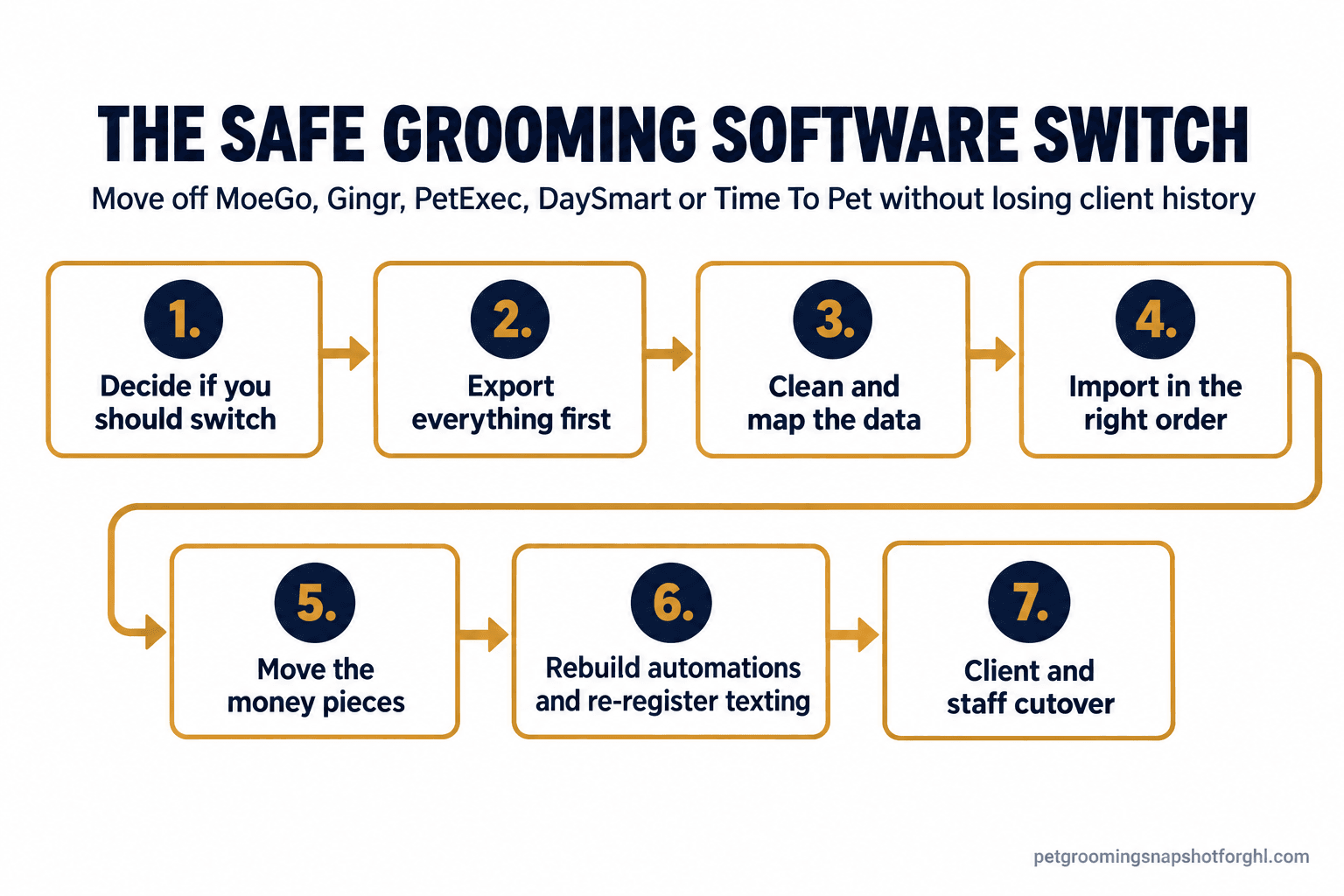
- Step 1: Decide if you should switch at all
- Step 2: Export everything before you cancel
- Step 3: Clean and map the data
- Step 4: Import in the right order
- Step 5: Move the money pieces
- Step 6: Rebuild automations and re-register texting
- Step 7: The client and staff cutover
- Steal this: the copy for a clean switch
- Solo van, salon, and multi-van fleet
- Objections
- FAQ
What a bad switch actually costs you
A grooming book is not a spreadsheet of names. It is years of context: which dog needs two people, which owner runs late, when each coat is due, who pays a deposit and who never has. Lose it and every regular becomes a stranger, you reask what you already knew, you miss a dog that bites.
The stakes are real. Pet grooming and boarding is a $15.4 billion category across roughly 193,000 US businesses, per IBISWorld’s 2026 data, and your slice of it is your client list. It is the one asset you cannot rebuild by spending money.
Step 1: Decide if you should switch at all
Switching is real work, so the reason has to be bigger than a bad week. Good reasons: your bill scales the wrong way as you grow, the tool cannot do a core job like route-based booking or deposits, or support failed you when it mattered. A weak reason: one clunky screen.
Run the honest math first. Grooming margins are thin, and more than half of dog owners now groom at home while paid grooming spend softened in 2025, per the APPA, so overhead matters. Add up what you pay today, add-ons included, then compare it against the new system plus the hours the move eats. Our pricing teardown shows where the real numbers hide.
How it breaks. You switch on emotion after a rough day, land somewhere no better, and pay the migration tax twice.
The fix. Write down the two or three jobs the new system must do better, then make the demo prove them with your kind of data. A switch you can defend on paper is worth the weekend.
Step 2: Export everything before you cancel
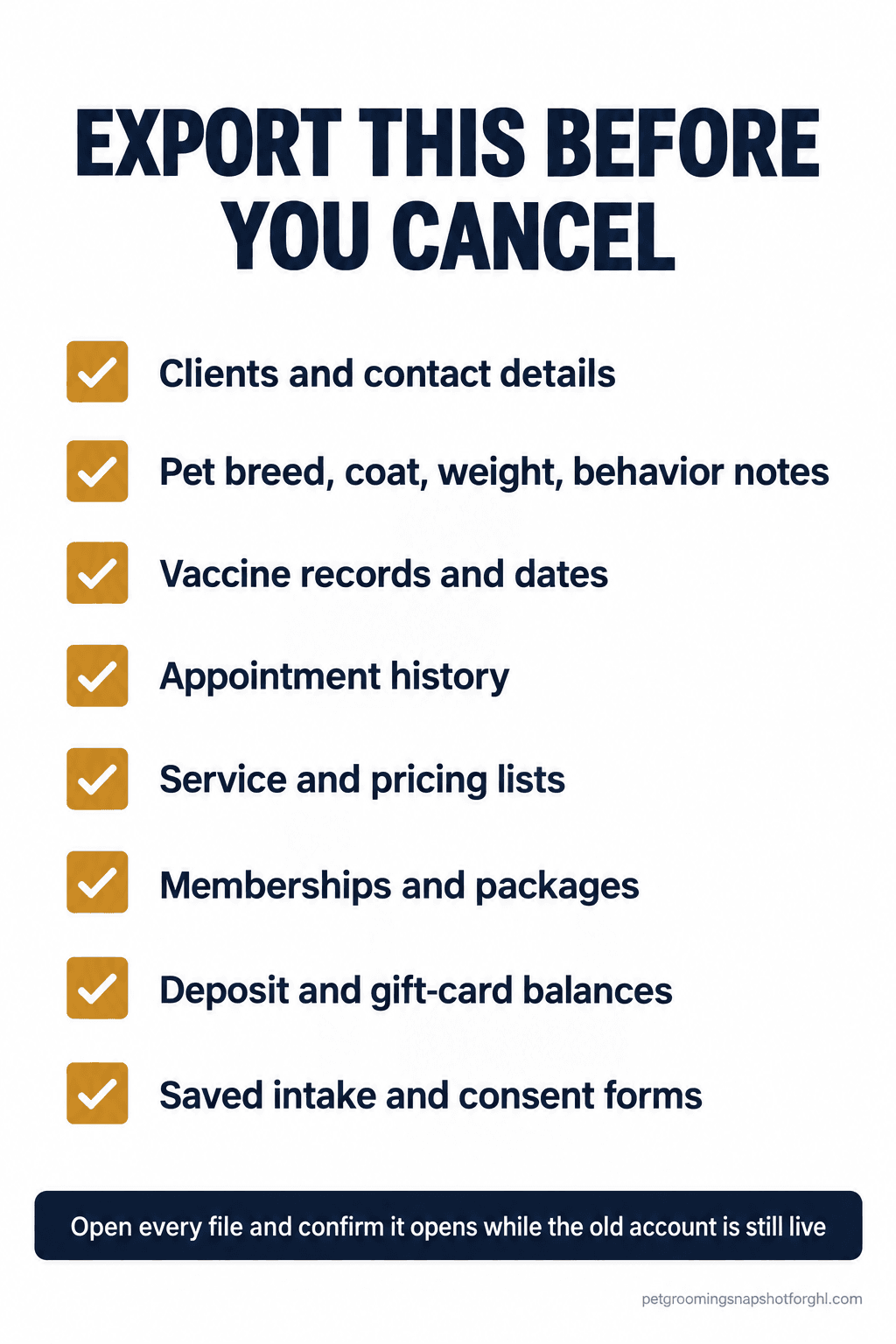
This step saves you, and it is where platforms differ most. Get every record out and confirm it opens while the old account is paid and live. Never cancel first, because access can close with the subscription.
“Everything” means clients and contact details, pets with breed, coat, weight, and behavior notes, vaccine records and dates, appointment history, service and pricing lists, memberships and packages, and deposit and gift-card balances. Export each as its own spreadsheet file.
How the major tools handle getting your data out is not equal:
| Platform | Can you export yourself? | Format | Watch out for |
|---|---|---|---|
| Time To Pet | Yes, self-service | CSV | “Export Client Data” and “Export Pet Data” buttons; pick your fields |
| MoeGo | Yes, self-service | Report download | Only the columns shown export; add columns first |
| DaySmart Pet | Reports yes, full export by request | CSV or TXT | Full client-list export runs through a request form, up to two business days |
| Gingr | Reported as difficult | Excel template | Users report no easy self-serve export; plan extra time |
| PetExec | No documented full self-export | QuickBooks export for accounting only | Getting data moved is a paid service, see below |
How it breaks. You export a client list that looks fine but quietly dropped the pet notes and vaccine dates because those live on a different screen, and you only notice after you have canceled.
The fix. Export one record type at a time, open each file, and keep the old subscription alive until the new system is verified.
Step 3: Clean and map the data
Between export and import is the step most people skip, and skipping it is why imports come out messy. Your old file and the new system almost never use the same column names or shape. “First Name” here is “Client First” there, and one tool keeps two pets in a row where the next wants one.
Do three things. First, dedupe: merge duplicate clients and pets, and give every client one clean phone number, since many tools match on phone to avoid duplicates. Second, map the columns: open the new tool’s import template beside your export and line them up field by field. Third, fix the data types: real dates, and flags like “matting” or “muzzle” in a field the new system can use, not buried in a note.
How it breaks. You import a raw export straight into the template. Half the pets attach to the wrong owner, coat types land in the notes field, and the new system is a mess you trust less than the old one.
The fix. Treat the mapped spreadsheet as the real deliverable. Get one client and their pets perfect, import that single row as a test, then run the full file.
Step 4: Import in the right order
Order is the difference between a clean load and a pile of orphaned records. Import history before the client exists and it has nothing to attach to. The safe sequence: clients first, then pets linked to those clients, then appointment history, then services and pricing, then memberships and packages, and only then the automations.
Most systems, MoeGo included, take a filled-in Excel or CSV template and match records by a key like phone number, skipping duplicates. Run a small batch first, ten clients and their pets, and check it before you load thousands: does each pet sit under the right owner, did the notes and vaccine dates ride along, is the standing appointment attached to the right dog.
How it breaks. You load everything at once in the wrong order, pets detach from owners, and history floats free.
The fix. One record type at a time, in sequence, with a ten-row test before each full load.
Step 5: Move the money pieces
Your client and pet records can transfer cleanly and you can still be missing the things that touch money. Saved cards, active deposits, memberships, packages, and gift-card balances almost never move automatically, because payment credentials are held by the processor and do not export as plain data. Rebuild these by hand.
Walk each one. Saved cards: most clients re-enter their card the first time they book, so make that easy and expected. Active deposits: list who has a credit and honor it manually so nobody loses money they paid. Memberships and packages: rebuild the plans and re-enroll members with their remaining balance. Gift cards: track outstanding balances and honor them at the desk until used up.
How it breaks. You assume deposits and gift cards carried over, a client shows up expecting their credit, and it is not there.
The fix. Make a one-page “money owed” sheet before you cancel: every open deposit, package balance, and gift card with the client and amount. That is your source of truth until every balance is honored.
Getting your data moved is not free everywhere. Some vendors run a paid import, a real switching cost.
One-time paid data-import fees, US dollars. $0 means self-service export at no charge. PetExec’s $300, no-refund fee is from its own data-transfer terms; Gingr’s paid import is a reported third-party figure, so confirm current pricing.
Step 6: Rebuild automations and re-register texting
Your reminders, confirmations, and rebooking nudges do not transfer. Every platform builds automations its own way, so you rebuild them, a chance to fix what annoyed you. For sequences that actually stop no-shows, our guides to cutting no-shows without nagging and the rebooking system that keeps chairs full lay out the timing worth rebuilding.
Then the piece almost nobody plans for: texting registration. In the US, business texting runs through A2P 10DLC, and that registration is tied to the messaging platform, not to you. A new system means re-registering your brand and campaigns with The Campaign Registry through the new provider, which can take days to approve, so start it early. Our A2P 10DLC and consent guide covers what it asks for.
How it breaks. You rebuild the booking flow, forget the texting registration, and go live. Reminders queue but never deliver, and it takes a week to notice the dogs stopped showing.
The fix. Put texting registration on the critical path, and do not go fully live until a test reminder lands on your phone.
Step 7: The client and staff cutover
The last step is human. Clients do not care which software you use, but they notice if the booking link changes, the reminder texts look different, or you suddenly ask for a card they already had on file. Left unexplained, that reads as chaos and a few will drift. A short, warm heads-up turns the switch into a non-event.
Staff need the same care, earlier. Train them before go-live, not during a full Saturday. Switch in a slow week, not your holiday rush. Keep the old system in read-only reach for a couple of weeks so anyone can check an old record.
How it breaks. You flip the switch quietly, clients get an unfamiliar text from an unknown number and ignore it, staff fumble the new screens, and week one feels like the shop forgot how to run.
The fix. Announce the change before it happens, train staff in advance, switch in a slow week, and keep the old data reachable. Boring is the goal.
Steal this: the copy for a clean switch
Lift these straight into your texts and emails, adjusting the bracketed parts.
Client heads-up (a week before, text or email):
Hi [Name], quick heads up from [Shop]. We are upgrading our booking system to serve you better. Starting [date], you will book at this new link: [link], and your reminders will come from [new number], so please save it. [Pet]’s history and your standing slot are all coming with us. Questions? Just reply here.
First booking after the switch (card re-entry, kept light):
Great to see [Pet] on the books! One small thing with our new system: please pop your card in at this link to hold the spot: [link]. It is a one-time step, then you are set for next time. Thanks for bearing with us during the upgrade.
Deposit or credit reassurance (for clients with a balance):
Hi [Name], you had a [$X] [deposit/credit] with us and we have you down for it in the new system, nothing lost. It comes straight off [Pet]’s next groom. See you [date]!
Staff briefing note (internal, pin it up):
We switch to [new tool] on [date]. Before then: everyone completes the training link by [date]. On switch day the old system is read-only, use it only to look up old records. All new bookings, notes, and payments go in [new tool]. [Name] owns the deposits-and-gift-cards sheet.
These keep clients with you through the one week they might wobble. Pair them with a full library of SMS templates every grooming salon should steal.
Solo van, salon, and multi-van fleet
The seven steps are the same at every size. What changes is where the risk sits.
The solo mobile groomer, one van. Your risk is time and single points of failure. Do the move in a genuinely slow week, and do not cancel the old tool to save $49 or $79 before the new one is proven. Route-based booking is likely a reason you are switching, so confirm the new tool nails it, which is what route-smart booking for mobile groomers is built around.
The 1-to-3 chair salon, 2 to 4 staff. Now the risk is coordination. Several people book, take notes, and handle payments, so the “money owed” sheet and staff training matter more than the export itself. Pick one owner for the migration, train the team before go-live, switch mid-week, and standardize how notes and flags are entered.
The multi-van fleet, 2 to 6 vans. Your risk is scale and money leakage. Per-van or per-seat pricing is often the reason you are moving, so model the new cost carefully and read the pricing teardown for where seat fees hide. Migrate in phases, one van at a time, and assign one owner for deposits, memberships, and gift cards across the fleet.
Objections
“Can’t the new software just import everything for me?” Some offer a guided or paid import, and it helps, but no vendor promises a perfect result. PetExec’s own terms say the transfer will almost always be lesser quality and exclude schedules and billing. The cleaner the file, the more survives, so the export and cleanup steps are yours to own.
“I already pay for MoeGo or Gingr. Isn’t switching just more cost?” Only if the new system does not pay for itself. If your bill scales with every van or staff member, or you pay for a tier full of features you never touch, the switch can lower your monthly cost within a few months. The migration is a one-time cost. The monthly bill is forever.
“I’m not technical. This sounds like a lot.” It is a checklist, not a coding project: export, map columns, load a test batch, then the rest. The one thing you cannot outsource is deciding what “correct” looks like, because only you know a certain dog needs two people.
“What if something goes wrong mid-switch?” That is why you overlap the subscriptions and never cancel early. If the import comes out wrong, you still have the live source to re-export from. Keep the old system paid and reachable until the new one is loaded, tested, and sending reminders, then cancel.
FAQ
Will I lose my client and pet history if I switch grooming software?
Not if you export everything before you cancel and import it in the right order. The loss happens when shops cancel the old system before the new one is verified, or import history before the client records exist. Export, confirm every file is complete, then import clients, pets, and history in sequence.
Can I export my own data, or do I have to ask the vendor?
It depends. Time To Pet and MoeGo let you export yourself as CSV or a report download. DaySmart Pet routes a full client-list export through a request form. Gingr users report no easy self-serve export, and PetExec offers a paid data transfer rather than a documented full self-export.
Do deposits, memberships, and saved cards transfer to the new system?
Usually not automatically. Saved card tokens are held by the payment processor and do not export as plain data, and active deposits, memberships, packages, and gift-card balances rarely carry over. List every balance owed before you cancel, and rebuild these by hand so no client loses money they paid.
Will my appointment reminders keep working after I switch?
Not until you rebuild them and re-register your texting. Automations do not transfer between platforms, and US business texting runs through A2P 10DLC registration tied to the platform, not to you. Re-register with the new provider and send a test reminder to your own phone before you cancel the old system.
How long does it take to switch grooming software?
For a solo groomer, a clean switch is often a weekend plus a week of overlap. For a salon or fleet, budget one to two weeks including staff training and a phased cutover. Data cleanup and the texting registration are the variables, and registration can take days to approve, so start it early.