A GHL contact actions bar for wet-hands updates
The contact actions bar adds quick-tag chips, workflow buttons and mini forms to every GoHighLevel contact. One tap adds a tag or saves a custom field, so rebooks and coat notes take a second. Included from Full Groom, $327 once.
Tap a chip. In GoHighLevel the tag lands on the contact and any workflow it triggers starts.
Try the contact actions bar inside GoHighLevel
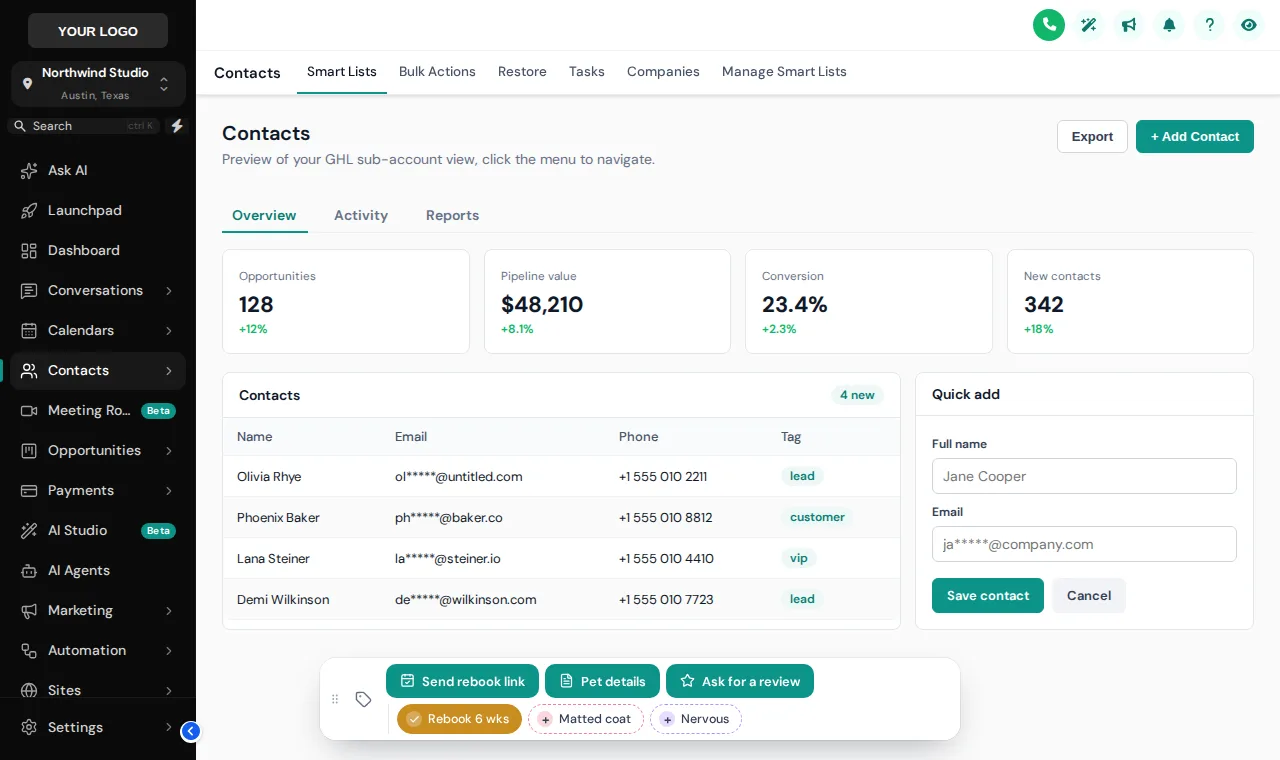
We loaded it with grooming chips and buttons. Tap Rebook 6 wks, open Pet details, then change the position or theme.
Warming up the live preview
Buttons and quick tagsThis is the real contact actions bar. Tap a quick tag, press Pet details to open its form, or drag the bar by its grip. Nothing is saved in the preview; inside GoHighLevel the contact updates straight away.
Four one-tap GoHighLevel quick tags that earn their place
Every chip or button either sets a tag or fills custom fields. Tags trigger the workflows you already run, so the bar is the front end and your automations stay the engine.
| On the bar | Type | What the tap does | What happens next |
|---|---|---|---|
| Rebook 6 weeks | Quick tag | Adds the tag "rebook 6 weeks" | Your rebooking workflow sends the booking link at the right time |
| Matted coat | Quick tag | Adds "matted coat" to the contact | A workflow can send the de-matting price note before the next visit |
| Pet details | Form button | Opens a small form for pet name, breed and next groom | Values land in the contact’s custom fields for reminders and personalised texts |
| Ask for a review | Button | Adds "review request" | The review harvesting workflow asks at pickup |
The workflows named here (rebooking, review requests) ship with the Pet Grooming Snapshot; the bar works with any workflows you build.
How to add one-click contact updates in GHL
Switch on the bar
In the editor, turn on the contact actions bar and choose where it sits: bottom center, bottom left, bottom right, top center, top left, top right.
Add quick tags
List the tags your team adds all day, each with its own color or a simple on and off color, so a tap adds or removes it.
Add buttons and forms
A button can add or remove tags (which can start any workflow), or open a small form that writes straight into custom fields.
Save and use it
Open any contact in GoHighLevel: the bar is there, draggable, and the contact updates the moment someone taps.
Contact actions bar comes with Full Groom at $327 one time, and with Best in Show.
Contact actions questions
Tags, workflows, forms and what the preview does not touch.
What is the GHL contact actions bar?
It is a small toolbar the customizer adds to the GoHighLevel contact page, with quick-tag chips, buttons and mini forms. One tap adds or removes a tag or saves custom fields, so common updates take a second instead of several clicks.
Can a button start a GoHighLevel workflow?
Yes, through tags. A button adds (or removes) a tag on the contact, and any workflow you have built with that tag as its trigger starts as usual. That keeps your automations in GoHighLevel where they belong.
What can the mini forms save?
Custom fields on the contact, such as pet name, breed, coat notes or the next groom date. Fields can be text, numbers, dates or a dropdown, and the values are saved to the contact as soon as someone presses save.
Where does the bar appear and can it move?
It sits in one of 6 positions you choose, and team members can drag it by its grip if it covers something. The engine remembers where each person left it.
Does the preview on this page change real contacts?
No. The preview runs the real bar on a sample contact page and nothing is saved or sent. Inside your GoHighLevel the same taps update the contact straight away.
How does this help a grooming salon?
Front desks and groomers repeat the same updates every visit: rebook, coat condition, behaviour notes, review request. Turning those into one-tap chips keeps records consistent, which makes every reminder and win-back workflow more accurate.
Which account includes the contact actions bar?
Full Groom ($327 once) and Best in Show.
Does it replace GoHighLevel tags or custom fields?
No. It uses the tags and custom fields you already have. It is simply a faster way to set them from the contact page.
Make every contact update one tap
The contact actions bar comes with Full Groom, alongside dashboards, pipeline boards and the menu builder, for $327 once.
Keep grooming: related parts of the GoHighLevel Theme Builder
GoHighLevel Theme Builder is our name for a self-serve GHL Customizer account, sold by Pet Grooming Snapshot for GHL. We are independent and are not affiliated with, endorsed by or sponsored by HighLevel Inc. GoHighLevel and HighLevel are trademarks of their owner. Template counts on this page come from the live customizer catalog (updated 2026-10-03).