
It is 8:10 on a Saturday. You are up to your elbows in a soaked goldendoodle, the dryer is roaring, and the phone starts buzzing on the shelf across the room. By the time you glove off and call back, it rings out. That person had a dog that needed a groom this week and your afternoon was open. Now they are scrolling to the next shop, and you never learned their name.
That is the whole case for online booking in one scene. Not that it is modern, but that it answers the phone when your hands are wet. Done right, it books the client, takes a deposit, and confirms the appointment before you have rinsed the conditioner.
Key Takeaways
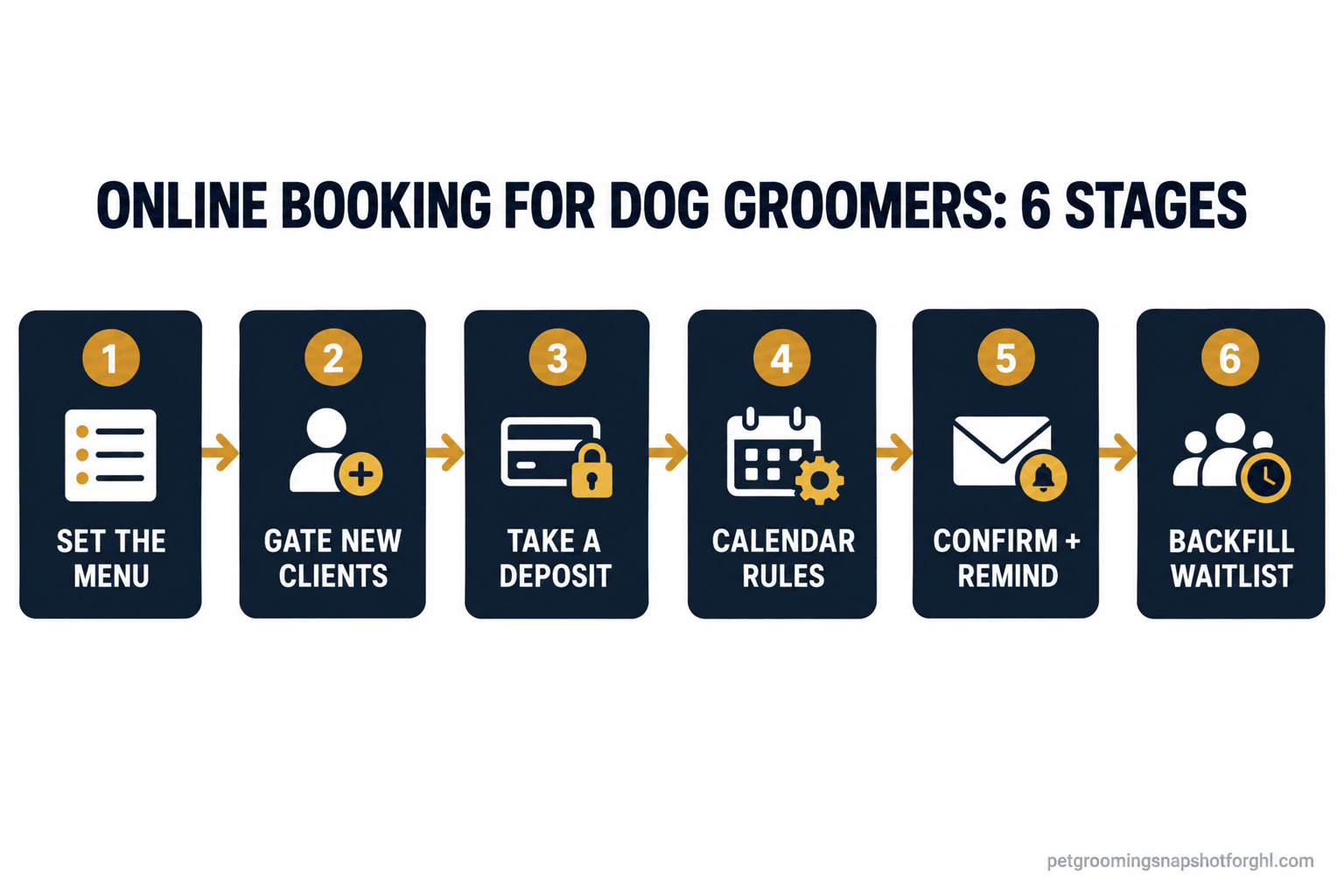
Online booking is six decisions you make once so the software says yes to the right grooms and no to the wrong ones while you work. Skip them and you get double-booked Saturdays and a matted dog booked for a quick tidy; make them and the page becomes your best front-desk hire. This guide walks all six, with the texts to steal and setups for a van, a salon, and a fleet.
What phone-tag booking is quietly costing you
Demand is not the problem. Americans spent $158 billion on their pets in 2025, and the American Pet Products Association projects about $165 billion in 2026, with dog ownership rising from 51% to 53% of households. The problem is the gap between deciding to book and you being free to answer.
US total pet industry spending, in billions of dollars, per the American Pet Products Association. 2026 is APPA’s projection.
That gap has a price. A booking page is live 168 hours a week; a small shop is staffed to answer calls maybe 40 to 50 of them, almost none on a Sunday night when a tired owner finally decides to deal with the shaggy dog. The BLS puts 2024 median pay for animal care workers at $33,860 and projects 11% growth through 2034, so more shops are chasing the same local dogs. Every booking a competitor catches while your phone rings out is a client they own.
The fix is not “get a Calendly link.” A raw calendar link with no rules is worse than the phone: anyone can book anything at any time. The fix is a setup that makes decisions for you, the next six stages.
Stage 1: Decide what is actually bookable
Most groomers put the whole price list online, then wonder why clients book the wrong thing. A doodle owner picks “bath and tidy” because it is cheaper, shows up with eight weeks of matting, and now you are three hours behind by 10am.
Keep the public menu to five or six services named the way an owner thinks (“Full groom,” “Bath and brush,” “Nail trim,” “Puppy intro”), each with a duration including dry time and a price band that scales by size and coat. Anything that needs your eyes first (heavy matting, aggressive dogs, a first-time senior) stays off the open menu, behind the Stage 2 gate.
How it breaks. You list “grooming” as one generic service with one slot, so a Pomeranian and a matted Aussie book the same 60 minutes and your day whipsaws between dead time and panic.
The fix. Make the dog’s size and coat a required question that drives time and price, or make separate small, medium, and large services so the calendar blocks the right time. Our guide to pricing by breed and coat type has the bands.
Stage 2: Split new clients from returning clients
This is the stage most tutorials skip, and the one that saves your Saturdays. A loyal six-visit client should book in fifteen seconds; a new client you have never seen should not grab a prime slot for a dog you have not laid eyes on.
Build two doors into the same page. Returning clients match to their record and see live availability. New clients go through a short intake first (breed, age, coat condition, temperament, last groom date) that either books them into a new-client slot or routes them to a quick call. A solo van confirms every new client; a three-chair salon lets most book directly and flags only the risky ones.
How it breaks. Every booker hits the same open calendar, so a first-timer with a nine-year-old doodle books your packed 9am Saturday, and you find out when they walk in.
The fix. Gate new clients behind the intake. Those questions double as the start of your liability paperwork, covered in the intake form and liability waiver guide.
Stage 3: Take money at the moment of booking
A booking that cost the client nothing is a reservation they will forget. A booking backed by a deposit, or a card on file with a clear policy, is a commitment. This is the biggest lever online booking gives you over the phone, because the page asks for the card without the awkward pause you feel asking out loud.
Pick one: a flat deposit off the final price, a percentage deposit, or a card on file with a stated policy. The one that does not work is “we have a deposit policy” with no step in the flow that collects it. Connect a payment processor, pick a rule (a flat $20 to $30 off the groom is easiest to accept), and make the deposit step required, not optional.
How it breaks. You switch booking on but leave deposits off for fear of scaring people away. A month later your no-show rate on self-booked appointments is unchanged, and you blame the software.
The fix. Start deposits on new clients and long appointments, then widen the policy once the no-show rate drops. The full economics are in the deposit and cancellation policy clients actually follow.
Stage 4: Teach the calendar your real constraints
An online calendar will happily book you into a day you cannot physically work unless you teach it your limits. This is where most “online booking is a nightmare” stories come from: the tool was never told the rules.
Your constraints are specific to you: how many dogs you can finish in a day, how long each service takes including dry time, how much buffer you need between dogs. A mobile groomer sets which neighborhoods they work on which days so the page never books a cross-town job that wrecks the route; a salon caps how many dogs can dry at once. Set a daily capacity cap, not just open hours, add buffers, build durations that include finish time, and block your lunch so the page never offers it.
How it breaks. You set hours of 9 to 5 and nothing else. The page books eight full grooms back to back, a mobile client forty minutes off your Tuesday route, and a drop-off at 4:45 you cannot finish before close.
The fix. Cap the day by dogs, not hours, and let the software protect your drive time. Mobile groomers should book by zone and day, broken down in route-smart booking for mobile dog groomers.
Stage 5: Confirm instantly, then hand off to reminders
The moment a client books, two things should happen without you touching anything: they get an instant confirmation, and the appointment gets queued into a reminder sequence that confirms again before the day. A booking with no reminder is a no-show waiting to happen.
The confirmation restates the policy they just agreed to and says what to do before the groom. Then set a cadence: one reminder at booking, one about 48 hours out asking for a one-tap confirm or reschedule, one the morning of. Make them two-way so a client can move the time instead of ghosting. The wording to steal is in our SMS templates every grooming salon should steal.
How it breaks. The reminders are one-way. “Reminder: Bailey is booked Tuesday 2pm.” The client means to reply, forgets, and ghosts. You gave them information, not a decision.
The fix. Make every reminder a decision, and make the 48-hour one your early warning. If nobody confirms, that is your cue to work the waitlist, not a surprise at 1:55.
Stage 6: Backfill cancellations automatically
Even with deposits and confirmations, some appointments move. The difference between losing that revenue and recapturing it is a waitlist that fills the gap without ten phone calls.
When a client cancels or fails to confirm the 48-hour check, the slot should offer itself to the next person who wanted that time. A good tool lets clients join a waitlist for a full day, then texts them automatically when a slot opens, first-come first-served, with a claim window of a few hours. You go from a hole in Tuesday to a filled Tuesday without lifting a finger.
How it breaks. You keep the waitlist in your head or on a sticky note, so when Tuesday opens you forget to fill it or spend your lunch calling people who already booked elsewhere.
The fix. Automate the offer so the software texts the waitlist the second a slot opens. This is the backfill logic that makes the no-show cost calculator less scary, because a filled cancellation is not a loss.
How the major booking tools handle self-booking
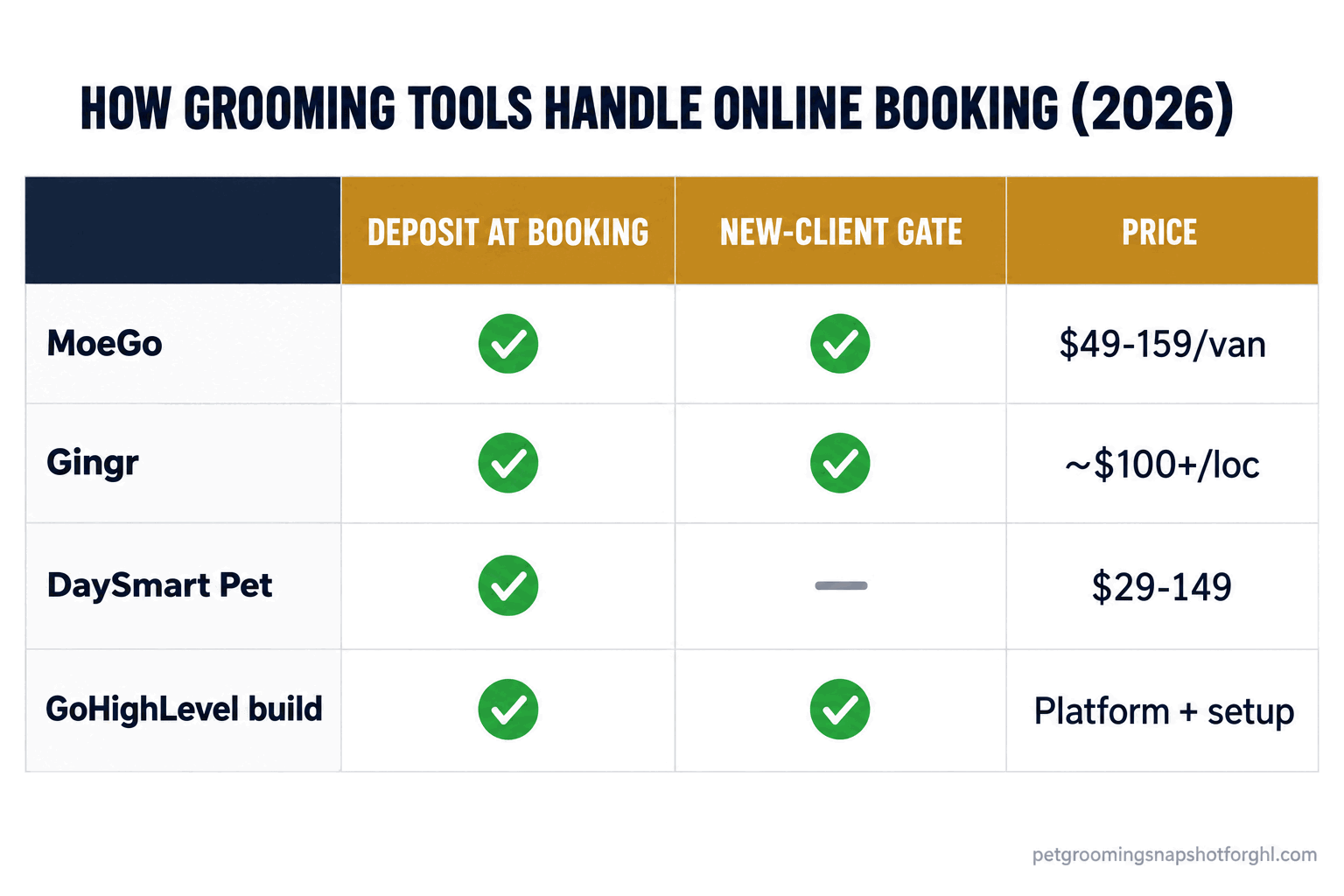
Every platform advertises “online booking.” What they do not advertise is whether it can take a deposit, gate new clients, and vary time by breed, and which tier you need. Confirm current numbers on each vendor’s page; pricing moves and several tiers are quoted by sales.
How grooming tools handle client-facing online booking, 2026
| Plan | MoeGo recommended | Gingr | DaySmart Pet | GoHighLevel build |
|---|---|---|---|---|
| Price | $49-159/van | ~$100+/loc | $29-149 | Platform + setup |
| Feature 1 | Client self-booking with deposits | Online booking and customer portal | Online booking across tiers | Booking, deposits, reminders, waitlist in one |
| Feature 2 | New-client approval and intake | Payments and SMS often add-ons | Two-way texting gated to top tier | Two-way texting and win-back built in |
| Feature 3 | Per van for mobile, per location for salon | Per location, strong for boarding | Per-user seats above base | You own the client data and flows |
| Feature 4 | Best for: mobile and salon groomers | Best for: grooming plus daycare | Best for: budget single operator | Best for: shops wanting one system |
| See the pricing teardown | Compare the real cost | What you actually pay | How it works |
The pattern is the same: online booking exists everywhere, but the parts that make it protect your day, deposits, new-client gating, two-way texting, often sit on a higher tier. Check MoeGo’s pricing, Gingr’s plans, Time To Pet’s pricing, and DaySmart Pet’s tiers, then read the MoeGo vs Gingr vs PetExec teardown before you trust the base price.
How this plays out: van, salon, and fleet
The six stages are the same for everyone. What changes is how tightly you gate and how much you automate.
The solo mobile van
You are the booker, the bather, and the driver, so your calendar has to be ruthless. Keep the menu to three or four services, gate every new client behind the intake and a request-and-confirm step (you cannot meet a biter cold in a driveway), and book strictly by zone and day. Take a deposit on every new client. The win is protecting your drive time.
The one-to-three-chair salon
Let most returning clients book directly into live availability and gate only the risky new ones. Set a daily dog cap per groomer and cleanup buffers, take deposits on new clients and long appointments, and turn the waitlist on properly, because a salon has the drying capacity to pull a backfill forward.
The two-to-six-van fleet
Now booking is a routing problem. Each van is its own calendar with its own zone and day, and new clients get the nearest van with open slots. Deposits are standard because the no-show math across six vans is brutal, and the waitlist runs per van and zone so a cancellation backfills from that van’s area, not the whole city.
Objections groomers raise before they switch
“Clients will book the wrong service and blow up my day.” Only if you let them, which is what Stage 1 and Stage 2 prevent. A short menu, required size and coat questions, and a new-client gate book the right job in the right block. The groomers who get burned put up a raw calendar link with no rules.
“I will lose control of my schedule.” You gain it. A rules-based page only offers the slots you decided to offer, caps the day where you capped it, and protects your buffers and route. You write the rules once instead of defending them on every call.
“My clients are older and will not use a booking page.” Some will not, and that is fine. Online booking catches the bookings the phone drops, not the clients who prefer to call. Keep taking those calls; let the page handle the Sunday-night booker.
“I already pay for MoeGo or another tool.” Then you likely have a booking engine already. The question is whether you set up the six stages inside it or just switched booking on, because most shops never configured deposits, the gate, or the waitlist. If the gaps are real, the switching guide covers moving without losing client history.
The demand is there. The question is who catches it.
People book when it suits them, not when it suits your phone. The 63% of online bookings that happen on a phone, per SimplyBook.me’s 2026 compilation, are mostly on a couch at night, not during your staffed hours. A page set up right catches that demand instead of handing it to the shop down the road.
Go back to the soaked goldendoodle and the phone buzzing on the shelf. With the six stages in place, that 8:10 call is not a lost client: the person finds your page, books a Thursday slot in their zone, pays a deposit, and gets a confirmation while you finish the rinse. The front desk you never hired made you a hundred dollars.
Your questions, answered
What is the best online booking setup for dog groomers?
Six decisions made once: a short honest service menu, a gate separating new from returning clients, a deposit step at booking, calendar rules that cap your day and protect your route, instant confirmation that hands off to two-way reminders, and an automatic waitlist that backfills cancellations. Most grooming tools can do all six once configured.
Should dog groomers take a deposit for online bookings?
Yes, at least for new clients and long appointments. A booking that cost nothing is easy to forget, while a deposit that comes off the final groom costs a client who shows up nothing and sharply cuts no-shows. A flat $20 to $30 deposit built into the flow is the least awkward way to do it, because the page asks for the card, not you.
Will online booking replace answering the phone?
No. Online booking catches the inquiries the phone drops, the Sunday-night booker and the Saturday call you cannot answer because your hands are wet. A page is live 168 hours a week versus the 40 to 50 a small shop is staffed to answer. Keep taking calls for clients who prefer them.
How do I stop clients booking the wrong grooming service online?
Keep the public menu to five or six clearly named services, make the dog's size and coat a required question that drives the time and price, and gate new clients behind a short intake. Most wrong bookings trace back to a missing rule, not the software.
Do appointment confirmation texts need A2P 10DLC registration?
In the US, business texting runs over the carrier system known as A2P 10DLC, which means registering your brand and campaigns and getting consent before you text. Confirmations, pickup texts, and marketing are separate message types, and many groomers wrongly assume a pickup text is exempt. Collect a clear opt-in as part of booking so consent is built in.